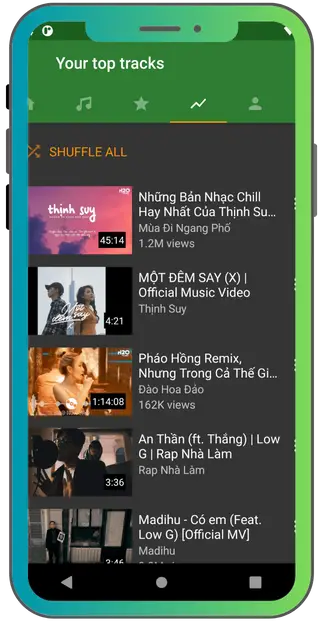
It offers many amazing features targeting every music lover. Below are the all features explained. Download apk ymusic and enjoy all amazing features.
Play youtube videos in background
When it comes to multi-tasking, meaning if you want to do your work while listening to music, this app lets you do it perfectly. You can play your favourite music on this app free of cost while keeping the screen off.
Enjoy ads free music experience
When you utilize the official youtube or youtube music application, annoying ads disturb your music experience. While using this application you can stream your favourite audio and videos without any pop ups or ads.
Download for offline listening
You can download any song, any music video or any other video in very high quality. Multiple quality options are available, you can download mp3, mp4, m4A files with just one click. If youtube videos support 4k, you can also download it in 4k quality.
Tune audios with Built in equalizer
It has 5 bands in built equalizer that lets you tune bass, terrible and mild frequencies to make the audio perfect and enhance your music experience. There are some presets also available like bass booster, pop, party, terrible booster, dance etc. audio virtualizer and additional bass booster is also available so you can enhance the audio quality in your own way.
Create and manage playlists
This app also lets you make your playlist containing your favourite songs. You can manage your playlists, name it, add or remove songs and even can download the complete playlist easily with just one click.
Persistent queue
When you close it or your android force stops it to free memory, your current playback queue is automatically saved. The next time you open the app, it picks exactly where you left off while the same song, same position in the queue and same playlist loaded.
Export and import your playlist
You can export your playlist as files in your device storage, it is helpful when you change the device. You can easily export your playlist via bluetooth, cloud or USB and import easily. All songs and their order is preserved.
Sleep timer
If you want to get to the bed with music turned on, set the sleep timer and music will be turned off automatically. You can set the timer to 15, 30 minutes or even an hour and no need waking up, disturbing your sleep to turn off music, it will do it for you automatically.
Audio normalization
Some songs come with low sound and some with high, when the music track changes, this app automatically adjusts the volume to provide you a comfortable sound experience.
Auto skip silence
This clever feature detects the silence part of music and skips automatically. It is useful for podcasts, live recordings or long musical pieces.
Multiple themes
This app lets you customize its appearance, so that when you interact, you experience a unique user interface.
Light mode: white background, good for day time.
Dark mode: dark background, easy for night.
Amoled black: best for amoled screens, save battery.
Dynamic theme: changes colours based on album art.
Modern black: a clean and comfortable look.
Android tv support
You can also enjoy this app on your android tv to experience the amazing quality videos and audios on a bigger screen. It supports android tv, nvidia shield, amazon fire tv stick and other devices.
Android auto support
Android auto is the system that mirrors your phone’s apps onto your car's built in screen. This app allows you to enjoy it easily on your car screen with a larger interface, easy gestures controls and enhanced music experience with cars built in a high level sound system.
Download manager
It comes with a download manager where your currently downloading files and previously downloaded files can easily be seen. You can pause, resume and even restart your interrupted downloads also.
Smart search
This app search is linked with the youtube library. You can search a song, genre, album, artist, playlist etc easily. You will find filtered and accurate results of your search.
Smart recommendations
This app uses AI and analyzes how you use this app and which type of content you enjoy on this app. Hence on this analysis, it recommends you music and videos according to your taste. “For you” section shows the content you frequently listen to.
No login required
It requires no sign up, no email and no personal information to use. You open the app and are ready to search and listen to the music. This no login feature is the indication of the best privacy this app offers to its users.
Multilingual interface
It supports 50 plus languages, you can switch to any language though settings anytime. This multilingual feature is helpful for all users of different regions and languages.
Lightweight performance
It is just 9 MB, it is lightweight and works perfectly and smoothly on low end devices (even 1gb RAM mobiles). Lightweight and smoothness of this app make it a perfect choice for every user.
YMusic apk - why it is not available on the play store
Google prohibits apps that violate youtube’s terms and conditions. Because this apk allows background play and downloading which are youtube’s premium features, it does not qualify for play store distribution.
It is common, many useful and feature rich apps live outside the playstore, and android specifically designed to allow this (sideholding).
Ymusic download apk
The apk file comes up with the following details.
|
Application name
|
Ymusic apk
|
|
Version
|
|
|
Size
|
9 to 12 MB
|
|
Platform
|
Android
|
|
Minimum android
|
Android 5
|
|
Permissions
|
Storage, microphone (for voice search)
|
|
Root required
|
No
|
|
Cost
|
Free
|
|
Availability on play store
|
Not available
|
|
Languages
|
Multilingual
|
|
Music source
|
Youtube (stream and download youtube videos and audios)
|
How to safely download YMusic apk (step by step)
Warning: above 60% sites provide fake apk files. Fake apk files can cause harm to your personal data and steal your banking information. Follow this guide, and download ymusic apk from our site, because it does not harm your data and is completely safe.
Visit our trusted website
Check the file size
Original apk is 9 to 12 MB, fake apk can be 5 or 20 MB, so if apk is not between 9 to 12 mb then do not download it.
Check permissions before installing
Original apk only asks permission of storage (for downloads) and microphone (for voice search). If the apk is asking for other permissions, it might be fake.
How to install YMusic on android
Enable unknown sources
Before installing apk:
-
Go to your device settings, go to apps.
-
Click on special app access or advanced.
-
Find your browser in the list.
-
Toggle “Allow from this source”.
Install the app
-
Click on the downloaded apk file from the notification panel.
-
Click on “Install” and wait for the process of installation.
-
Tap open to launch the app.
First time set up
When you open it for the first time, it does not need any account login, you just have to allow notifications, microphone and storage permissions. Use the search bar and at the top to find and play any song.
How to install YMusic on PC via BlueStacks
Windows and Mac do not allow direct installation of apk files. But you can enjoy ymusic on pc easily using android emulators like bluestacks.
What you need
-
A window or mac pc with 4GB of RAM (8GB recommended).
-
Bluestacks android emulator (free download from the site).
-
The Y Music apk file (free download from our site).
Step by step installation
-
Download bluestacks emulator from the official bluestacks website.
-
Open it and complete the initial android setup.
-
Download ymusic apk file from our site.
-
In bluestacks, click the “install apk” button in the corner.
-
Select y music apk, bluestacks will install it automatically.
-
Find this app in the apps library, open it and enjoy it.
Ymusic for iphone (ios)
It is not officially available for the iphone. You cannot directly install this application in your ios device. Because ios privacy is very strict and it restricts you to install apk files. It only allows installation of the apps that are available on the official app store.
If you want to enjoy this on your iphone, you must jailbreak your iphone which will break the security of your iphone, but you will be able to install any apk file on your iphone including y music apk.
Ymusic android tv
-
Enjoy all the content easily on the big screen.
-
Just install file manager in your android tv.
-
Transfer ymusic apk via USB or shared network.
-
Open the file manager and navigate to the apk file.
-
Tap the apk file, install it and open it to enjoy it on your android tv.
Ymusic android auto
Android auto displays a simplified version of your phone's app in your car screen. You can also experience youtube background play and high quality audio on your car easily using this app.
-
Open android auto in your phone (if not available then install it first).
-
Connect your phone to your car via USB. Android auto launches automatically.
-
Ymusic will appear in the media app section, use the touch screen or steering wheel to play, pause, skip or search.
Ymusic apk old version
Old versions are always beneficial for the people who use old devices. Latest versions sometimes come with bugs and lag due to low hardware limitations, hence we also provide completely safe ymusic old versions you can download and install.
How to use YMusic - complete beginners guide
Home screen
When you open ymusic, you see three things, a search bar at the top, trending music in your region and personalized recommendations. The navigation bar at the bottom has tabs for Home, search, downloads, playlist and settings.
Searching and playing a song
-
Tap the search bar at the top of the screen.
-
Type the song name, artist or album.
-
Results appear as a list of tracks, tap any track to start playing.
-
The now playing screen shows the song title, artist, album art and playback controls.
-
Press your home button and play in the background.
Downloading a song for offline listening
-
While the song is playing, click the three dot menu next to the album.
-
Tap “Download”, a format box appears.
-
Choose mp3, mp4 or m4A.
-
Choose the video or audio quality and click “Download”.
-
It will be saved to your phone's storage. Find the downloaded song and play it when you have no internet connection.
Creating a playlist
-
Tap the playlist and click the “add” button.
-
Give your playlist a name and tap to create.
-
Search for a song, click three dots next to the album and tap “Add to playlist”.
-
Select the new playlist and the song is added.
Using the queue
The queue is your current listening song. Click on the queue icon to see all upcoming tracks. You can reorder them by dragging, remove the tracks individually and can clear the entire queue.
Navigating the settings
Tap the settings icon, you will see following settings:
Audio: equalizer, audio normalization, auto silence skip etc.
Appearance: themes selection.
Downloads: default download location quality etc.
Playback: repeat mode, shuffle, crossfade
Sleep timer: set and manage the auto stop timer
Language: change the app interface language
YMusic audio quality
Ymusic apk latest version is popular for its audio. You can stream and download songs in high quality.
Streaming quality
it offers audio quality according to what youtube offers. Mostly the audio quality you can experience are:
-
128 kbps ACC - standard quality, slightly compressed.
-
256 kbps ACC - high quality, mostly available on all tracks.
Download quality
When you download music from YMusic app apk, it offers the following quality options.
-
128 kbps (M4A)
-
256 kbps
-
320 kbps
-
160 kbps
YMusic background play - how it works
This app uses youtube videos songs and plays them as audio, it saves data and battery both and works smoothly. This app uses android’s standard audio playback system and lets the music play in the background.
Things that can interrupt background play.
How to enable unrestricted background play
Open phone settings, find ymusic, allow background activity and disable battery optimization.
Ymusic equalizer - how to set it
Built-in equalizer is a powerful feature of this app. You can adjust the sound quality in your own way.
-
Open the app and go to settings.
-
Tap audio settings and tap equalizer to open the EQ panel.
-
High frequencies are for sharp sound, low frequencies are for soft sound.
-
Custom presets are also available like classic,electronic, etc, you can easily apply.
Ymusic sleep timer - how to use it
You set the timer and at that time the sleep timer turns off your music automatically. This feature is helpful for people who particularly fall asleep listening to music.
Setting the sleep timer
-
From Now playing screen, tap the timer icon.
-
Select a preset duration, 15, 30, minute, 1hour or more.
-
Tap set or start, a small timer indicator appears, when time reaches to zero your music will be stopped.
How to download youtube songs free offline with YMusic (MP3, MP4, M4A)
Method 1 - from now playing screen
-
Play the song you want to download.
-
Tap download icon, choose format and quality and tap confirm.
-
Your download will start immediately.
Method 2 - from search results
-
Search a song, click on three dots next to the track.
-
You will see “download mp3, m4A and others.
-
Choose the format and quality you want to download and tap confirm to start the downloading.
Method 3 - download an entire playlist
-
Open the playlist you want to download.
-
Tap the three dot menu, select download all, choose format and quality and start downloading.
Where are downloads stored
These downloads are stored in your phone’s local storage.
Is YMusic safe? An honest review
Short answer: yes, if you download the original apk from our site it is safe because it does not contain any malware or spyware and has been tested many times. The problem comes when people download it from fake websites.
What makes it safe
-
The original YMusic apk is completely safe because it does not contain any malware or spyware.
-
It does not harm users personal data or banking information.
-
It only permissions it needs are storage (for downloads) and microphone (for voice search)
Real danger - fake sites
-
Many fake sites appear when you search for ymusic apk or app.
-
They provide fake apk to steal your personal information, so avoid it and install this apk from a safe site.
Is YMusic legal?
it resides in a legal grey area, it violates youtube policies and copyrights. But the copyright act does not harm you if you use it personally. Millions of people use this as a youtube video and audio downloader.
Youtube terms of services
Youtube does not allow downloading and background play officially while y music provides both so it violates youtube terms of services.
Copyright law
Using copyrighted content without permission violates copyright law.
The bottom line
Millions of people use ymusic every day, legal action against individual users is essentially unheard of. But you should use this app for personal listening, not for redistribution.
Ymusic alternatives 2026
Newpipe
Free, works for android, private, sports video and audio playback
Libre tube
Free, works on android, open source, private, sponsor unblocked
Youtube premium
Paid, works on android, ios and web, official, legal, for all devices
Spotify
Free and Paid, works on android, ios and web, licensed music and podcast
Audiomack
Free, works on android, ios, free legal streaming
Soundcloud
Free and Paid, works on android, ios and web, independent artist, electronic music
Deezer
Free and paid, work on android, ios and web, large catalog and flowfeature
Frolomuse
Free and paid, works on android, local plus youtube music hybrid
Innertune
Free and open source, works on android, youtube music with privacy focus
Seal
Free and open source, works on android, download focused, multiple sources
Ymusic vs youtube premium
|
Features
|
YMusic
|
Youtube (free)
|
|
Background Play
|
Yes
|
No
|
|
Screen off play
|
Yes
|
No
|
|
Ads
|
None
|
Yes (frequent)
|
|
Offline downloads
|
Yes (mp3, mp4, m4a)
|
No
|
|
Data usage
|
Low (audio)
|
High (video)
|
|
Cost
|
Free
|
Free and premium
|
|
Built in equalizer
|
Yes
|
No
|
|
Sleep timer
|
Yes
|
No
|
|
Custom playlist
|
Yes
|
Yes
|
|
Android tv support
|
Yes
|
No
|
YMusic vs Spotify
|
Features
|
Ymusic
|
Spotify
|
|
Music library
|
All of youtube (billions of tracks)
|
80 millions licensed tracks
|
|
Cost
|
Free
|
Free with ads and paid
|
|
Background play
|
Yes
|
Premium only
|
|
Offline listening
|
Free
|
Premium only
|
|
Audio quality
|
Up to 320 kbps
|
Up to 320 kbps (premium)
|
|
Podcast
|
No
|
Yes
|
|
Equalizer
|
Built in
|
App only
|
YMusic vs NewPipe
Newpipe is an open source alternative of ymusic offering background play and offline download both. Below is the comparison between some major features of both these.
|
Features
|
YMusic
|
NewPipe
|
|
Open source
|
No
|
Yes
|
|
Interface
|
Polished
|
Basic
|
|
Android auto
|
Yes
|
No
|
|
Ease of use
|
Yes
|
No
|
|
Login required
|
No
|
No
|
|
Background play
|
Yes
|
Yes
|
|
Offline download
|
Yes
|
Yes
|
|
Sponsor unblocked
|
No
|
Yes
|
|
Video playback
|
Available
|
Available
|
|
Equalizer
|
Built in
|
External only
|
Common YMusic problems and how to fix them
Problem 1 - “Alert” error message
This is the most common error. It pop ups due to following reasons:
How to fix it
-
Check your internet connection, switch from mobile data to wifi.
-
Try searching for different songs.
-
Update it to the latest version.
-
Clear the cache of this app.
-
If the issue persists on all songs, uninstall it and reinstall.
-
Turn off VPN if connected
Problem 2 - background play stops
Cause: Android battery optimisation is killing the app.
Fix: disable battery optimization in settings
Cause: low RAM is forcing the android to close background apps
Fix: clear background apps
Cause: poor internet connection
Fix: download songs for offline playback
Problem 3 - downloads are not saving
-
Check the storage permission of the app
-
Check available storage space
-
Change the downloader folder in the app settings
Problem 4 - YMusic is crashing on launch
-
Clear the cache and data.
-
Uninstall and reinstall the app.
-
Check if your android version is compatible.
Problem 5 - audio quality sound poor
Problem 6 - app not appearing in android auto
-
Make sure android auto is up to date.
-
Enable developer mode in android auto and allow unknown apps.
-
Connect your phone to your car via USB and restart it.
How to update YMusic apk
-
Unlike playstore, it does not autoupdate, you have to do it manually.
-
Go to our website and download ymusic apk latest version for android.
-
Tap the downloaded apk file.
-
Android will show “update” instead of “Install”, if you already have YMusic.
-
Tap “Update”, the new version installs over the old one.
-
All your playlist, downloads, music and every setting is preserved.
Important note: updates come irregularly, typically when youtube makes changes to the backend that break the app. So if you find any problem, check for updates at least once a month.
Pros and cons
Pros
-
Lightweight, perfectly works on low and high end devices
-
100% free of cost
-
No account required
-
Plays youtube videos in background
-
Download high quality audio and videos from youtube and youtube music app
Cons
-
Not available on the play store
-
Violates youtube terms of services
-
Risky if downloaded from fake sources
Conclusion
If you cannot afford youtube premium and want to enjoy youtube videos and music in the background and download for offline, ymusic is perfect choice for you. It is completely free of cost, contains no ads, light weight and works smoothly on all devices. It is the best youtube HD downloader. It is risk free and safe to install if you download it from our trusted site. So why wait, download this app for your device and enjoy youtube content ads free streaming and downloading.
Does ymusic works on iphone?
You cannot directly install it, the one unsafe option is jailbreaking your iphone.
How to play youtube music in the background for free on android?
Ymusic is the best option which allows you to do so easily and perfectly.
Is ymusic apk safe to install on android?
Yes, if you download it from an official and trusted source, it is safe to install.
Does ymusic cost anything?
No, it is completely free of cost.
Why is ymusic not available on the google play store?
Because it violates youtube terms of service and copyright law.
How do I save youtube music offline without premium?
Ymusic allows you to download mp4, mp3 and m4a files easily and free of cost without any premium subscription.
Can I transfer my ymusic file to my new phone?
Yes, you can export your playlist as files and import it into a new phone easily.
Does ymusic work without an internet connection?
It works offline for the songs you have downloaded.
How do I listen to youtube with screen off on android?
Install ymusic and play any youtube video and music with screen off easily.
Can I use ymusic on my TV?
Yes, ymusic supports android tv. You can sideload the apk onto android tv powered devices.
What is the main difference between ymusic and newpipe?
Both offer downloads, background play and billions of songs. The main thing is that newpipe is open source.
Is ymusic legal to use?
Ymusic exists in a legal grey area. It violates youtube terms of services but not affect if you use it personally.
Can I use ymusic on a budget or low RAM phone?
Yes, it is a lightweight app and runs smoothly on low RAM phones also.